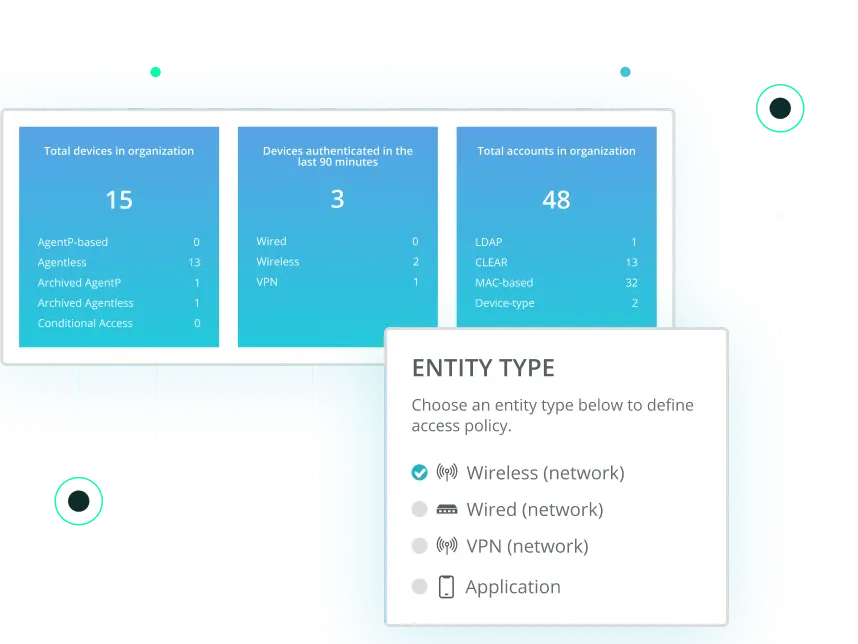


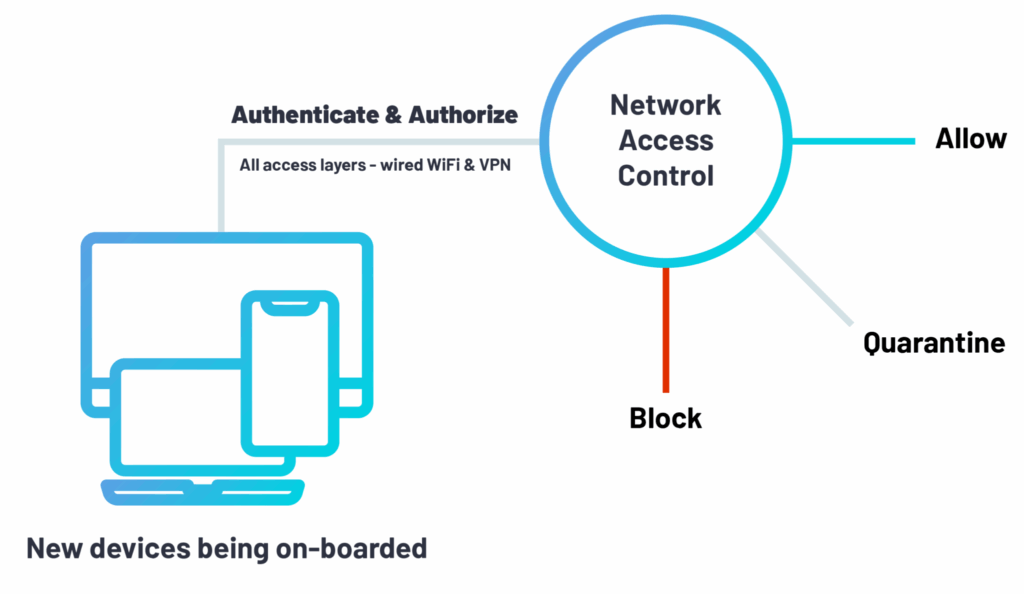
Network Access Control (NAC) sits within the larger field of cybersecurity, and more specifically network security. It is a technology that enables organizations to enact its own unique policy for how and when endpoints (desktops, laptops, smartphones, etc.) can connect to their corporate networks. NAC solutions are typically designed to allow IT security teams to gain visibility of each device trying to access its network, and specifically the type of device and access layer being used (i.e. wifi, wired ports, or VPN).
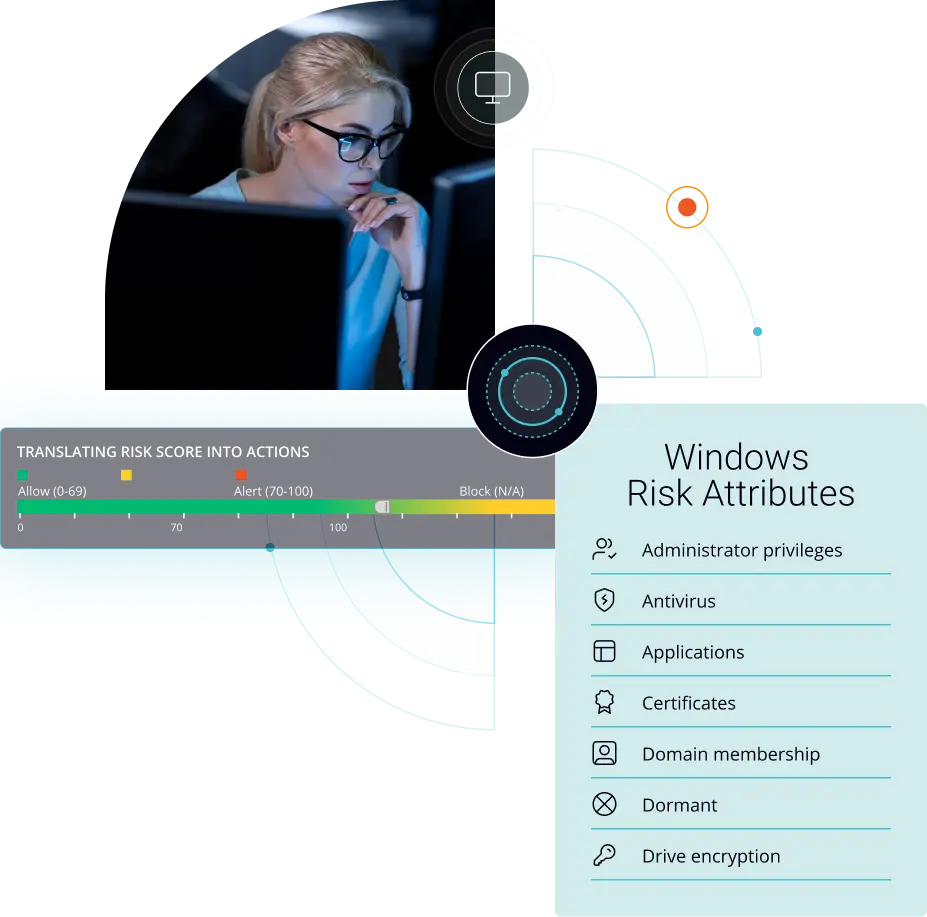
Today, NAC provides a number of powerful features on top of what it was originally designed for years ago. These include security posture assessments for endpoints, which pinpoints any associated endpoint risks, allowing network security administrators to control network access based on their organization’s risk tolerance threshold.
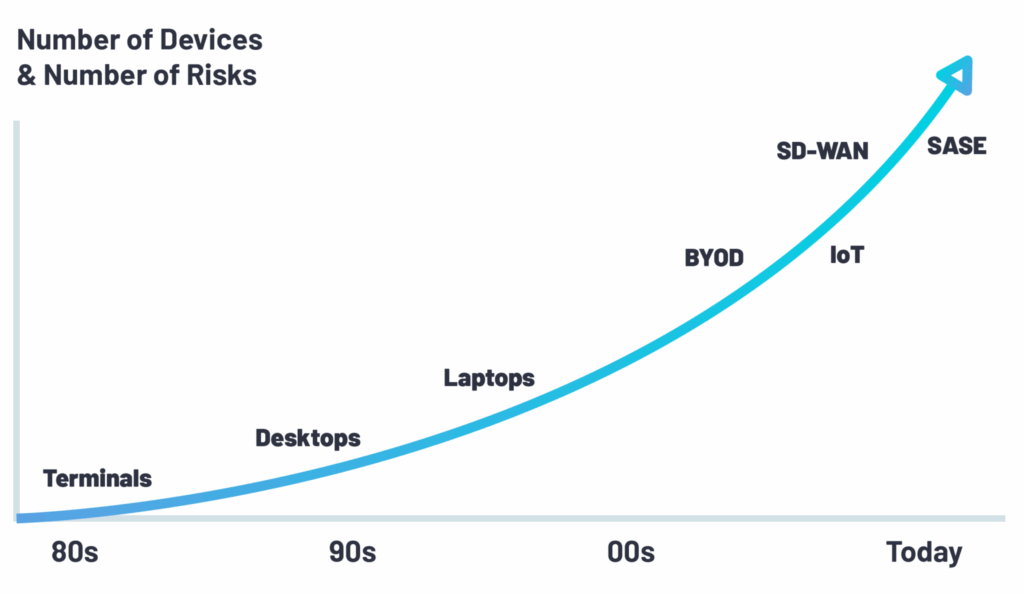
With the rise of cloud computing, remote workforces, bring-your-own-device (BYOD) policies, and the internet of things (IoT), network access control has become a much more critical part of the larger cybersecurity technology stack at most companies. The technology itself has also evolved quite drastically in response to these emerging trends and their impact on networking and ensuring network security.
The use cases for NAC today are constantly expanding. Network security professionals leverage NAC solutions for network visibility, the discovery of endpoints, security profiling, compliance enforcement, remediation…the list goes on. In general, NAC is designed to do two core tasks:
Network access control delivers a host of benefits to the organizations that deploy it. Generally speaking, the value unlocked by NAC can be broken into three distinct areas of focus:
One of the most interesting aspects of NAC is the fact that unlike many other areas of network security, it brings more than just the value of security to the table. In particular, NAC delivers three core operational values:
The importance of network security goes without saying. Network access control, however, checks the boxes for a variety of IT security best practices, including:
Highly regulated industries like banking, financial services, and healthcare require strict compliance policies when it comes to their networks. NAC helps to deliver this and more through:
Within each of the three primary areas of value of NAC are a variety of different use cases for NAC. These include…
NAC is frequently used for device onboarding, which is the process of providing new devices with access to the corporate network for the first time. It sounds simple, but it’s anything but. Business units and even departments (think Finance & Accounting, for example) often have their own VLANs since they’re dealing with very sensitive, confidential data. The task of setting up such VLANs and onboarding new devices is just one of dozens of tasks overseen by frequently overburdened IT teams. So, if not done correctly at first, it can open the door to potential network vulnerabilities, such as a person gaining access to a part of the network he/she should not have the privileges for. At a small scale, managing access manually if often sufficient. For larger organizations, however, this just isn’t sustainable. As a result, many large organizations that don’t have a secure onboarding process will often compromise on network security hygiene.
At some point in the workday, most companies will have non-employees visiting their offices for meetings and business dealings. These guests are typically on-site for brief periods of time but may need wifi access during the course of their stay. Typically, each organization defines the level of authentication and monitoring they want for their visitors. Common policies include:
Additionally, many businesses hire contractors or consultancies to tackle specific projects. These individuals and groups will need network access for extended periods of time and will need to be granted access to company resources and sensitive, proprietary data. NAC is used to dictate and enforce the level of access these types of individuals receive based on internal policies.
In recent years, remote work has soared due to a greater demand for mobility and flexibility. This has given rise to the adoption of bring your own device (BYOD) policies within many organizations. Now, while this approach makes operational (and even financial) sense, it does come with a caveat. By allowing employees, contractors, and guests alike to use their own devices to connect to the network, you’re immediately faced with issues like data leakage, malware infections, the mixing of corporate and personal data, and more.
With BYOD, a network access control solution can effectively secure such a fragmented network through multiple methods of authentication, and by making sure device risk posture is valid and continuously remediating any security issues in real-time. First, network security administrators can use a dedicated SSID for employee device authentication – no matter if it’s managed or personal. They can then create a separate SSID for guests and contractors to authenticate those individuals to the guest WiFi. The other option available for authentication is through the use of directory credentials. Integrating tools like Okta or Active Directory with your NAC can allow you to authenticate manage corporate devices through certificates, and personal credentials for BYOD.
Captive portal is a web page for authenticating users and verifying their device type and posture state. While this method is sufficient for visitors, it is an insufficient solution for employees or permanent visitors on your network. The most common use cases for captive portal are: 1) Guest access; 2) Self-service portal for BYOD / IoT on-boarding. It’s important to note that this is an interactive method to access the network, so when non-interactive devices, such as IoT are “pushed” to a captive portal, they can not react and thus can not gain access to the network. In order to use IoT onboarding with a captive portal, the end-user should either register the IoT in the self-service portal or download some form of credentials to be inserted to the IoT device (such as a digital certificate).
For fully remote employees or contractors, companies have traditionally relied on VPNs to establish secure encrypted connections for remote access to the corporate network. A VPN does not stop an endpoint from accessing the network, however – it’s only a way of providing remote network connectivity. By itself, a VPN is missing the ability to authenticate a user – it can not prevent “unhealthy” devices from connecting to the network. In the instance of remote access, NAC can be layered over the top of a VPN, VDI or other remote access methods, such as a Meraki Z3 Teleworker Gateway, to provide effective authentication and access control, as well as endpoint risk profiling – just like any other access layer (i.e. wifi or wired port).
Your corporate network is only as strong as its weakest security link. This means continuous risk posture assessment is paramount. By continually monitoring the network, your network and security teams can stay ahead of cyberattacks with the ability to identify new risks in real-time, react to these risks, and take action. In a world with ever-expanding boundaries and an exponential increase in types of endpoints, continuous risk posture assessment must function no matter location, device type, or the type of data is being transferred.
Having a rapid remediation plan in place will not only help prevent further damage or the lateral spread of attacks but also allow for business continuity. Effective endpoint remediation consists of:
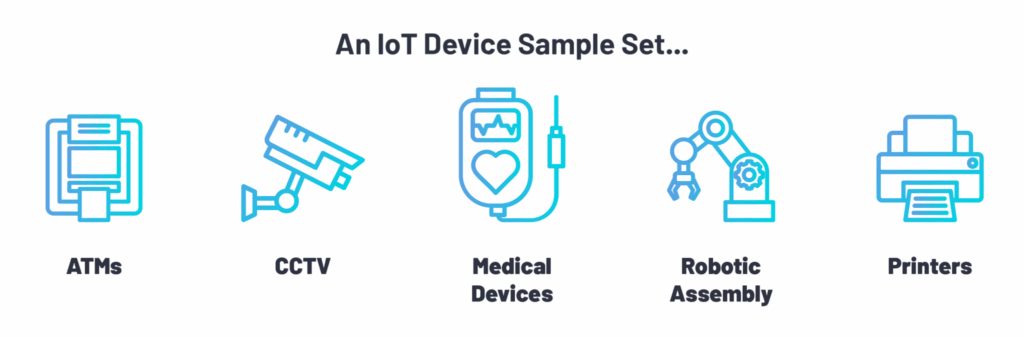
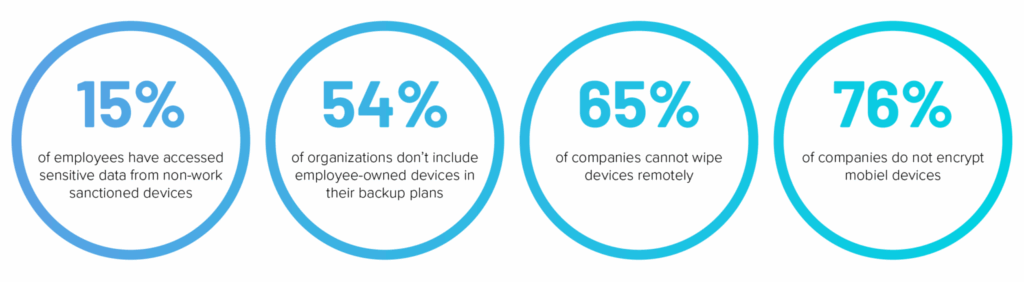
To combat the many risks posed by these new endpoints, companies are turning to NAC to gain visibility, knowledge, and control over IoT devices – much the same as traditional PCs and VoIP phones based in the office.
There is a huge variety of IoT devices, and in general, there’s a serious lack of centralized management with regards to their security posture. Many of these IoT devices still rely on IT security technology from the 1980s, with no password brute force controls and no available patches. It’s not a question of if vulnerabilities exist on IoT devices, this is a given.
Today, it’s a matter of ensuring these devices can be properly controlled to they can’t compromise the network. Currently, the only line of defense is segmenting them out of the network. Making sure only authorized users and devices can access them – this is exactly what NAC solutions are doing in an automatic method.
Industries like banking, financial services, and healthcare are typically subject to a plethora of compliance regulations, such as SOX, HIPAA, PCI-DSS, GLBA, and now GDPR. Embedded in many of these regulations are certain network security parameters that necessitate access control so that sensitive personal and confidential information is not compromised. Once a company has defined its internal network security compliance policies, it needs to implement a network access control solution to put in them into effect in order to continually assess its compliance standing.
NAC is used to enforce regulatory policies and maintain compliance across the organization. In practice, this typically means:
Network security teams define and activate access control policies to control device access to the corporate network, which is ultimately based on the device authorization state. Once a device is authorized for network access, a network access policy determines which specific virtual LAN (VLAN) that device or user is directed to.
On top of that, the policy also defines, for each type of authorization violation, whether to deny entry or whether to quarantine the device by assigning it to a specific VLAN or apply an ACL.
In addition to defining an access control policy, network administrators will typically define a risk assessment policy, which assigns a risk score to each device. This score will indicate the level of risk posed by the device.
Depending on the NAC solution in use, these risk scoring systems may differ. A risk assessment policy defines, for each device attribute (such as OS, security posture, geo-location, and more), the risk rating to apply if the device violates the current policy in use.
At the end of the day, the risk score is used to determine whether allow, block, or quarantine from accessing the network. This is the backbone of NAC.
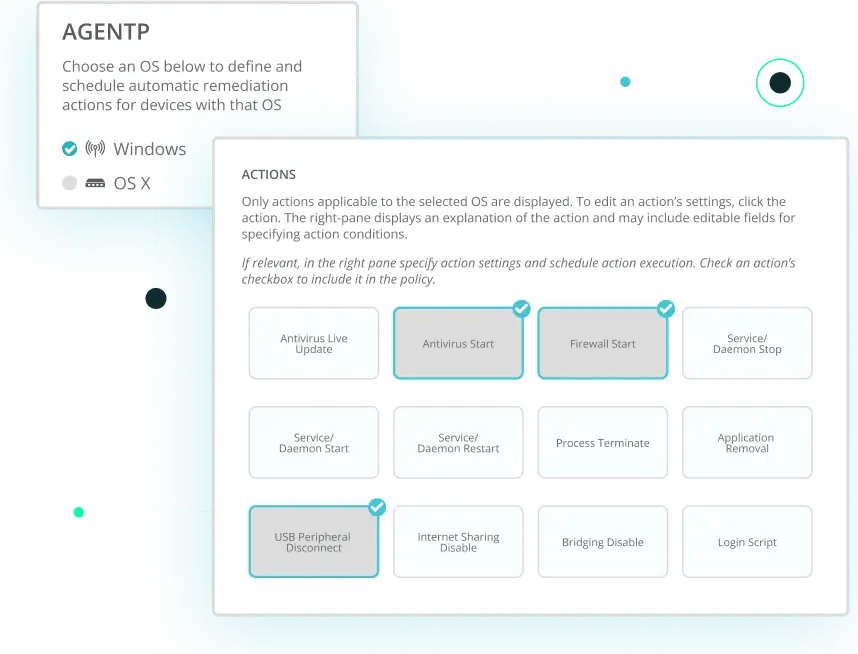
In some instances, the network security team may define a series of remediation policies. Essentially, a remediation policy consists of unattended corrective and preventive actions (CAPA), automatically applied to devices upon every transmission or on a recurring basis. A remediation policy can be used to reduce devices’ risk scores and increase compliance levels for network access.
Within the world of network access control, “post-connect” refers to a device being allowed to connect to the network and immediately being checked for authentication. If a device does not meet the organizational criteria for authentication, it will be blocked from having access to the network (or access will be limited). In contrast, “pre-connect” means that authentication decisions are being made before a device is allowed on the network. Only once the device is authenticated will it be granted access to the network based on the policy. 802.1X is a traditional pre-connect method. In general, a pre-connect approach is more secure since the device is granted access to the network only after identified as an organizationally trusted device. Post-connect is more operational for end-users, as they are granted access to the network before a decision is made.
Today, most NAC solutions can perform authentication and authorization without the need of an agent. Agents are typically employed for the following reasons:
As we go into further detail below, if you can move NAC to the cloud, you should. There is a myriad of benefits to doing so. At a high-level, these include operational time savings thanks to easier deployment and less on-going maintenance, better accessibility (especially for distributed enterprises), more flexibility as your business needs change, etc. In general, enterprises are increasingly adopting purpose-built cloud technologies for different operational needs, and NAC is no exception.
Not every organization has the ability to deploy a cloud NAC solution, however. One of the main hindrances of doing so is a lack of openness or internal expertise for cloud services. There still remain dwindling concerns, misconceptions and unrealistic expectations over the potential benefits and overall security of public cloud services, which has resulted in some industries such as government agencies, healthcare, and education – to name a few – to be slow in adopting new enterprise cloud technologies.
A core function of NAC is the profiling of network traffic and connected devices. In general, there are two approaches to profiling:
Passive profiling means that a company’s NAC solution has been allowed to see all traffic across the network, and uses this intelligence to observe and analyze traffic to develop a passive profile of each device.
On the other hand, active profiling means that a company’s NAC solution has been configured to initiate requests to the endpoints so that each device can have a profile created for it.
As today’s networks explode in size and scope, particularly with remote workforces on the rise, it’s imperative that your NAC solution can manage access control across all existing access layers. This includes the obvious – wired ports and WiFi.
It also must be able to manage the various remote access methods used within your organization. These may include VPN, virtual desktop infrastructure (VDI), Meraki Z-Series Teleworker Gateways, and beyond.
Nearly every primary management and productivity tool used by businesses have shifted to the cloud. Network access control is no exception. The inherent productivity, operational, economic, and accessibility benefits have driven this trend in the last fifteen years.
When it comes to NAC, however, there is a big difference between cloud-based and cloud-delivered. Some NAC providers offer an accessible cloud-based platform from which to manage network access, but this typically still requires on-site hardware to be installed.
With a cloud-delivered approach, you stand up everything from a RADIUS server in the cloud to allow for centralized authentication and authorization up to certificate authority. This saves a significant amount of time and means that even large distributed organizations can implement NAC across their many locations in a fraction of the time as traditional on-premise network access control solutions.
Today, 802.1X is the standard protocol for network access control. When searching for a NAC solution, the ability of the system to deliver 802.1X authentication is of the utmost importance.
With access control based on 802.1X, network administrators can confidently block rogue devices, quarantine noncompliant endpoints, limit access to specified resources – whatever your internal policy calls for. 802.1X remains one of the best ways to authenticate devices because of its continuous and direct communication, in contrast to post-scanners, or other less secure authentication solutions that expose the network to vulnerabilities.
While “zero-trust” has become another overused buzzword in the world of network security, it is, in fact, an effective approach to sealing your network off from rogue devices. With zero-trust, an organization inherently does not trust any endpoint inside or outside its perimeters.
A zero-trust network access control solution can eliminate the need for extensive endpoint scanning since the status of a device is already known. This doesn’t eliminate all of the attack surfaces, but it does help in protecting both endpoints and your network.
The ability to continuously assess the risk of devices connected to or trying to connect to your network is paramount. Understanding the risk posture of devices – on-site or remote – and proactively taking action based on endpoint risk – such as allowing, quarantining, or denying access across access layers – is the best way to ensure network threats are kept at bay.
The world is changing – threat surface is expanding, and companies are increasingly turning to purpose-built enterprise cloud applications to streamline business processes. Today, it’s not enough to just protect what’s on-premise – you need to know the risk posture assessment of every device that connects to corporate resources, no matter location.
Awareness is only a piece of the puzzle, however. When considering a NAC solution, it’s important to understand if it can easily remediate devices that sit outside of internal risk policies and restore those devices to the proper posture to eventually grant network access. Put simply, ensuring devices are healthy reduces security risk. That means network administrators can sleep a bit more soundly at night.
As we covered earlier, real-time device remediation has a major operational benefit as well – it saves time! By eliminating the need for network or security administrators to fix devices manually, you’re freeing them up for more important tasks.
Risky technology behavior like inserting an untrusted USB drive, or failing to update a firewall or anti-virus is prevalent. We’re almost all guilty of it. The ability to prevent this risky behavior is thus important. Not just for the sake of lowering the exposure time, also saving important time for the organization by fixing the issue automatically and preventing a potential breach.
Leveraging MFA for NAC that looks at a user’s credentials and an enrolled device is critical to ensuring access control across today’s expanding networks. MFA should be integrated within your NAC, especially on remote access.
This approach ensures that security is offered on two levels: protection of the user identity, and authorization of the device – making sure only managed and secure devices are allowed to gain access.
With MFA, if a user’s credentials are compromised, they’re effectively useless and if the device being used is not enrolled with the NAC you cannot access the VPN, VDI, or cloud applications.
The adoption of Software-as-a-Service (SaaS) and cloud services has decentralized data traffic flows, making Multiprotocol Label Switching (MPLS) inefficient for wide area network (WAN) transport. This has given rise to SD-WAN for the implementation of software-defined branch (SD-branch), now allowing IT environments to be extended to branches outside of the headquarters that need high-quality network connectivity.
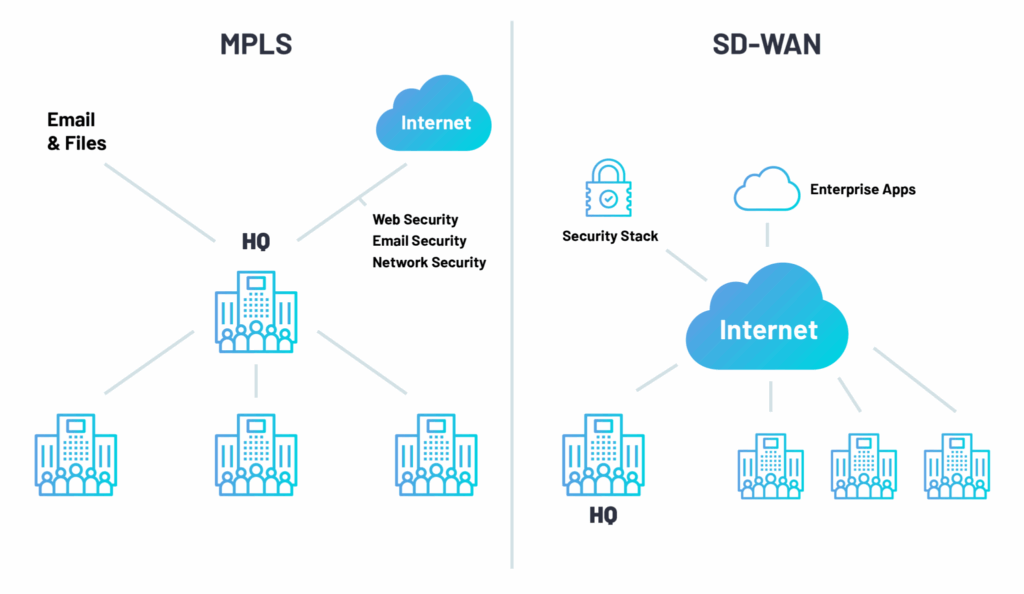
Traditionally, in order for NAC to effectively operate, it has needed a direct connection to headquarters and appliances deployed on-site at individual branches. This is a costly, time-consuming endeavor, and has historically limited the use of SD-WAN and SD-branch. NAC has adapted by moving to the cloud, eliminating the need for on-site appliances and on-going maintenance. Now, all one needs is an internet connection to implement.
In 2019, Gartner introduced SASE as a new enterprise networking technology category. In essence, SASE converges the functions of network and security solutions into a single, unified cloud service. This marks an architectural transformation within the realm of enterprise networking and security, and it means that IT teams can now deliver a holistic and flexible service to their businesses.
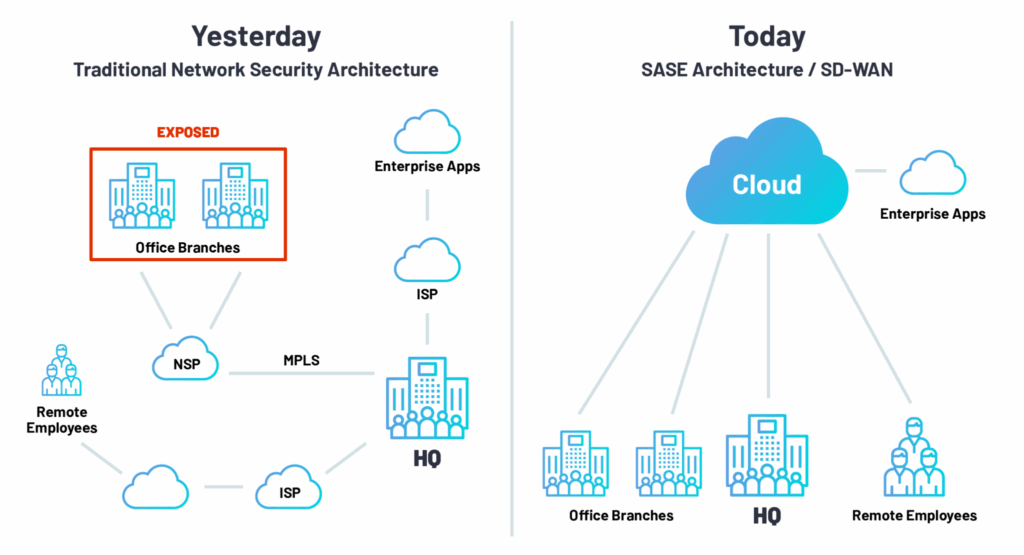
The logical next step in the evolution of network security is for organizations to be able to leverage a NAC solution that’s delivered as a cloud service. This eliminates the need for costly on-site appliances and on-going maintenance. Now, all that’s needed to control network access at branches and the headquarters alike, is an internet connection.