
Passwords are a thing of the past. They represent a weak point for any organization as users often model unsafe behavior like re-using passwords or writing them down in a flat file. Not to mention the variety of increasingly convincing phishing e-mails and social engineering scams! To really ensure things are secure, you need certificate-based authentication. Portnox can help you get there. With Portnox and passwordless authentication, you can take the headache out of managing network access once and for all.
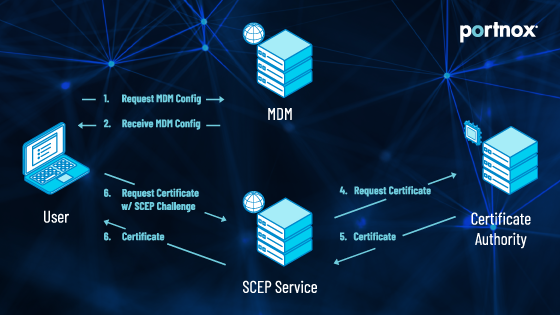
Portnox supports SCEP (Simple Certificate Enrollment Protocol)…so deploying certificates is – well – simple. We can act as your Certificate Authority or you can bring your own. And did we mention?…Portnox integrates with MDM solutions like InTune and Jamf so all your users can join the network with their own devices without IT having to set up and provision everything. Give your IT security team the gift of no more password lock-out tickets with Portnox!





User authentication is verifying the identity of an information system or network user. This is typically done through authentication protocols, whereby users must provide a username, password, and possibly some form of identification. Network security authentication is used for various reasons, including validating that the users are who they claim to be, restricting access to certain resources and services, or protecting assets such as information.
Typical WiFi Router authentication is via shared key authentication – a shared key (aka password) is manually set on the router, and any devices wanting to connect must have that shared key. The key is encrypted so it (theoretically) can’t be viewed by any outside parties according to the protocol you choose. Here are the 3 most common:
Network-level authentication for a remote desktop is a method whereby the user’s session is established after the user has successfully entered their user id and password. The network then authenticates the connection by comparing the entered password to some other value obtained from the server and sending back an authentication code (also known as a ticket) to be entered by the user. The advantage of this system is that there is one set of credentials between the server and client, which minimizes or eliminates any replay attacks.
In cybersecurity, authentication plays a critical role in allowing users to gain access to the network and resources of an organization. It also provided a high assurance regarding network devices and services, such as email, web, file storage, and policies. Authentication is performed at the user layer, at the transport layer, at the application layer, and in some cases, at the link layer. Moreover, authentication present proof that the user is who they claim to be and prevent unauthorized users from accessing computers or networks.
The best authentication protocol has the highest level of security and the smallest amount of overhead. This can be achieved by implementing a sufficiently secure mechanism to authenticate user identities to the system and using only that authentication mechanism for all types of user authentication. Achieving high security with minimal overhead is done primarily by using strong cryptography and enforcing strong password policies. Strong cryptography includes hardware-based encryption such as Trusted Platform Module (TPM) or Intel Secure Key Platform (SSP).
After completing the form, an email will be sent to you with the report download link.