

A SOC analyst pulls up a threat log at 2am. Something’s misbehaving on 10.1.45.112. Is that the CFO’s laptop? A contractor’s phone on guest Wi-Fi? A server that’s been compromised? The log doesn’t say — it just says an IP address did something, and IP addresses don’t have names. So the analyst goes digging: DHCP leases, VPN session logs, RADIUS accounting, trying to reconstruct who was sitting at that address twenty minutes ago. By the time they’ve got an answer, precious minutes — the ones that mattered most — are already gone.
IP-based firewall policy has a built-in flaw: the address can reassign itself the moment someone reconnects to Wi-Fi, renews a DHCP lease, or opens a VPN tunnel. Security teams don’t think in IP addresses. They think in people, roles, and groups: finance, contractors, the engineering team. Translating between the two, by hand, under time pressure, is where a lot of incident response hours quietly disappear.
The Fix
That’s the gap the new Portnox Firewall Identity Mapper closes — and its first supported integration is Palo Alto Networks.
Here’s how the Firewall Identity Mapper works: Portnox Cloud already knows who’s authenticated to your network and what IP address they landed on, since that’s the job it’s doing already for NAC and RADIUS. The Firewall Identity Mapper — a small Docker container you deploy on a host with reach to your Palo Alto management interface — takes that mapping and pushes it to the firewall’s User-ID engine over its XML API. From there, it’s a two-step resolution: Portnox binds an IP to a username, then pulls that user’s group membership from your identity provider. When traffic hits the firewall, it checks the mapping table and enforces policy by group — not by subnet.
Practically, that changes what a rule looks like. Instead of maintaining IP address objects and hoping nobody moves, you write “Engineering can reach GitHub” and mean it literally. When someone joins, changes departments, or leaves, the firewall’s enforcement updates with them, automatically — no rule edit required. And when that 2am investigation happens, the threat log already says who, not just where.
On the Deployment Footprint:
- It’s outbound-only. The container talks out to Portnox Cloud and out to your firewall’s management interface. No inbound ports, and your firewall never needs to be internet-reachable.
- Deployment is deliberately narrow. Portnox Cloud generates the docker run command for you, pre-filled with your org and instance details, from Settings → Integration Services → Firewall Integration Service. On the Palo Alto side, you create a least-privilege admin role scoped to just the User-ID XML API permission — nothing broader.
- One container, multiple firewalls. A single deployment can maintain identity mappings for more than one Palo Alto connection at once.
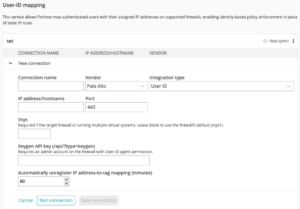
Palo Alto is the first vendor this ships for. More integrations are on the roadmap. For now, this is a real, shipping capability for anyone running Palo Alto firewalls alongside Portnox NAC — and the next time someone’s digging through DHCP leases at 2am trying to figure out who was on 10.1.45.112, the answer’s already sitting in the log.